Gaskin: A Modern Wedge Serif That Commands Attention
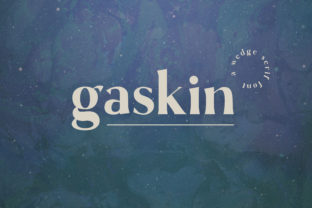
Typography isn’t just about legibility—it’s about voice, presence, and intention. When you choose a typeface like Gaskin, you’re not selecting letters; you’re choosing an attitude. With its sharp edges, high contrast, and unmistakable wedge serifs, Gaskin stands apart in a landscape crowded with safe, neutral fonts. It’s bold without being aggressive, refined without feeling distant—and it works hardest where subtlety fails.
What Makes Gaskin Distinctly Modern?
Gaskin belongs to the wedge serif category—but it doesn’t follow tradition. Unlike classic wedge serifs that echo mid-century signage or typewriter-era letterforms, Gaskin reimagines the genre for digital clarity and expressive impact. Its serifs are precise, angled cuts—not flared, not rounded, not softened. Each one feels intentional, almost architectural. The vertical stems are robust, while the thin horizontal strokes create dramatic contrast—enough to catch the eye, but not so extreme that readability suffers at small sizes.
This balance is rare. Many high-contrast fonts sacrifice function for flair. Gaskin doesn’t. Its x-height is generous. Its counters—especially in letters like ‘a’, ‘e’, and ‘s’—are open and well-proportioned. Even at 14px on screen, body text remains crisp and comfortable. That versatility makes Gaskin more than a headline font. It’s a system—designed to scale across interfaces, print collateral, motion graphics, and branding systems.
Where Gaskin Shines (and Where It Doesn’t)
Gaskin thrives in contexts where personality matters: editorial mastheads, luxury packaging, tech startup identities, art direction for cultural institutions, and even experimental UI components. Think of a boutique coffee roaster launching a new single-origin line—their label needs to feel artisanal but confident. Gaskin’s sharp geometry conveys craftsmanship; its warmth (yes, it has warmth—thanks to subtle stroke modulation and organic terminals) keeps it approachable.
It also performs exceptionally well in motion. Because each glyph has strong directional cues—the downward thrust of the ‘V’, the upward lift of the ‘A’, the decisive cut of the ‘T’—Gaskin animates with purpose. A logo lockup using Gaskin can transition smoothly from static to kinetic without losing identity.
That said, Gaskin isn’t ideal for every use case. Long-form web copy? Possible—but only with careful line height, letter spacing, and responsive sizing. For dense legal disclaimers or academic footnotes, a more neutral serif or sans-serif may serve users better. And while Gaskin includes a full Latin character set and thoughtful OpenType features (like stylistic alternates and ligatures), it currently lacks extensive language support for Cyrillic, Greek, or extended diacritics—so global multilingual deployments require planning and fallback strategies.
Real-World Pairings That Work
Pairing Gaskin successfully hinges on contrast—not competition. Its strong personality means companions should offer breathing room, not rivalry.
- With neutral sans-serifs: Try Gaskin for headlines alongside Inter, Manrope, or IBM Plex Sans. The clean lines of the sans-serif ground Gaskin’s drama without dulling it.
- With monospaced fonts: In tech or developer-facing design, Gaskin + Fira Code or JetBrains Mono creates a compelling tension—human expression meets computational precision.
- With restrained serifs: For editorial layouts, Gaskin works surprisingly well with Freight Text or Miller, especially when used in different weights and scales. The key is hierarchy: let Gaskin lead, then recede into quieter voices.
Avoid pairing Gaskin with other high-contrast serifs—or anything overly decorative. Two strong personalities in one layout cancel each other out. Simplicity gives Gaskin space to resonate.
Integrating Gaskin Into Your Workflow
If you're evaluating Gaskin for a project, start with intent—not aesthetics. Ask: What do we want people to feel before they read a single word? Confidence? Innovation? Craft? Authority? Gaskin answers those questions visually, before semantics begin.
For designers using Figma or Adobe XD, Gaskin’s variable font version (if available through your license) unlocks real-time weight and width control—no need to swap files for bold or condensed variants. That flexibility speeds up iteration, especially during responsive testing. Developers will appreciate its WOFF2 optimization and straightforward CSS implementation:
@font-face {
}
Then apply it with precision:
h1 {
}
That kind of control lets you fine-tune emphasis—not just for visual hierarchy, but for emotional nuance.
Consider Licensing Early
Gaskin is typically offered under commercial licenses—some with web, desktop, app, and ePub permissions bundled; others sold à la carte. If your project spans multiple platforms (e.g., a brand identity used on packaging, a website, and a mobile app), confirm coverage before committing. Some foundries offer trial versions with limited character sets—perfect for mockups and client presentations, but not production-ready.
Also note: Gaskin’s uniqueness means it’s rarely included in standard font stacks or cloud services like Google Fonts. You’ll likely self-host or use a trusted font provider like Fontshare, Typewolf-approved vendors, or the foundry’s own platform. That adds a small layer of technical responsibility—but also ensures consistency and performance control.
Why Designers Are Choosing Gaskin Now
In an era of algorithmic homogenization—where AI-generated logos, templated websites, and stock typography dominate—Gaskin offers something increasingly rare: human-authored distinction. It doesn’t try to be everything. It knows what it is: sharp, considered, contemporary.
Brands adopting Gaskin aren’t chasing trends—they’re making statements. A fintech startup might use Gaskin to signal reliability with edge. A gallery might deploy it to frame artwork with quiet authority. An indie publisher could build an entire visual language around Gaskin’s rhythm—using its alternates to differentiate chapter titles, pull quotes, and colophons.
And because Gaskin avoids nostalgia, it feels future-facing without being sterile. It doesn’t reference the past to justify itself. It simply exists—confident, clear, and ready to shape meaning.
A Note on Accessibility and Inclusion
High contrast fonts sometimes raise accessibility questions—particularly for users with dyslexia or low vision. Gaskin addresses this thoughtfully: its letterforms avoid ambiguity (‘I’, ‘l’, and ‘1’ are distinct), its spacing is generous by default, and its italic variant maintains strong readability—not just stylistic flourish. Still, always test with real users and tools like axe or Lighthouse. Never rely solely on visual appeal. Pair Gaskin with sufficient color contrast (at least 4.5:1 for body text), avoid justified alignment in long paragraphs, and ensure interactive elements retain focus states—even when styled with Gaskin.
Gaskin doesn’t solve accessibility on its own—but designed with care, it supports inclusive communication rather than hindering it.
Final Thoughts: Gaskin as a Design Decision
Choosing Gaskin isn’t about novelty. It’s about alignment—between voice and visuals, between strategy and execution, between what a brand says and how it feels. It rewards thoughtful application and punishes lazy defaults. Used well, it becomes inseparable from the message it carries. Used poorly, it overwhelms or alienates.
So ask yourself: Does your project benefit from clarity with character? From structure with surprise? From confidence with craft? If yes—Gaskin isn’t just an option. It’s an invitation to stand out, with intention.