Sealand: A Maritime-Inspired Color Font for Designers Who Value Distinctive Typography
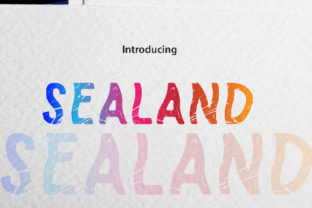
Sealand is a distinctive OpenType-SVG color font designed with nautical energy in mind. Unlike standard monochrome typefaces, Sealand embeds layered color, texture, and subtle illustrative detail directly into each glyph—think rope-wrapped letterforms, wave-like contours, and weathered, salt-sprayed edges. It’s not just a font that *suggests* the sea; it evokes the tactile feel of maritime signage, vintage ship manifests, and coastal branding—without requiring manual illustration or complex layering.
What Makes Sealand Stand Out Among Display Fonts?
Most display fonts rely on weight, contrast, or geometric novelty to command attention. Sealand takes a different path: its uniqueness lies in how it merges typographic function with embedded visual storytelling. As an OpenType-SVG font, it renders color, gradients, and vector-based textures natively within supported applications—no need to convert outlines or apply swatches manually. This means “S” doesn’t just sit on the baseline—it arrives with a coiled rope motif; “A” may echo the curve of a hull; “N” can carry a subtle barnacle texture—all preserved at any size and resolution.
This approach sets Sealand apart from both traditional serif/sans-serif display fonts and even other decorative fonts. While many sporty or adventurous typefaces lean on sharp angles, exaggerated x-heights, or aggressive tracking, Sealand grounds its energy in authenticity—not speed or aggression, but endurance, craft, and environment. Its rhythm feels deliberate, like hand-painted lettering on a dockside crate rather than a digital sprint.
Compatibility: Where Sealand Works—and Where It Doesn’t
Sealand functions seamlessly in Adobe Photoshop (CC 2017+), Illustrator (CC 2018+), Silhouette Studio (v5.0+ with Designer Edition), and Inkscape (v1.1+). In these environments, its color layers, transparency effects, and SVG-based details render as intended—no workarounds needed. You type, and the maritime character appears fully formed.
However, compatibility has clear boundaries. The OTF and TTF files included with Sealand are *not* functional in Cricut Design Space. That’s not a shortcoming of the font itself—it reflects how Cricut interprets font data. Cricut relies on standard outline paths and does not support OpenType-SVG features like embedded color or multi-layer glyphs. If your workflow depends heavily on Cricut for vinyl cutting, heat transfer, or craft projects, Sealand won’t deliver its full effect without significant manual recreation (e.g., converting text to outlines and reapplying color and texture in Illustrator first).
This isn’t unusual—many color fonts face similar constraints. What matters is clarity: if your project lives primarily in Adobe or Silhouette ecosystems and benefits from rich, expressive typography, Sealand integrates smoothly. If your output pipeline requires direct Cricut compatibility *and* you need color fidelity out of the box, you’ll likely need to evaluate alternatives—or adjust your process.
When Does Sealand Fit Best?
Sealand excels in contexts where tone, atmosphere, and thematic cohesion matter more than neutrality or scalability across dozens of formats. Consider these realistic use cases:
- Branding for coastal businesses: A small oyster bar, a dive shop, or a sustainable sail-clothing line might use Sealand for logos or menu headers—where its texture reinforces identity without needing additional iconography.
- Editorial design: A travel magazine feature on Atlantic island communities could set pull quotes or section titles in Sealand to subtly anchor the reader in place—its visual language supports narrative, not distracts from it.
- Digital assets with controlled rendering: Social media banners, email headers, or web graphics built in Photoshop or Illustrator benefit from Sealand’s consistency—no font substitution risks, no missing colors.
It’s less suited for long-form body text (its decorative nature reduces readability at small sizes), multilingual typesetting (it currently supports Latin-based languages only), or systems requiring font subsetting or web embedding via @font-face (OpenType-SVG isn’t broadly supported in browsers). Those needs point toward robust variable sans-serifs or well-hinted serif families—not Sealand.
How Sealand Compares to Other Approaches
Designers often weigh Sealand against three common alternatives: hand-lettered custom work, layered monochrome fonts, and system-native maritime-themed fonts.
Hand-lettering offers maximum uniqueness but demands time, skill, and revision overhead. Sealand delivers a high-fidelity, editable, reusable alternative—ideal when you need maritime character quickly, consistently, and affordably. It’s not a replacement for bespoke illustration, but it bridges the gap between off-the-shelf fonts and full custom development.
Layered monochrome fonts (e.g., those with shadow, outline, or fill variants) require manual stacking and alignment in design software. With Sealand, those layers are baked in and scale together—no risk of misalignment at different sizes or export formats. That saves time and ensures fidelity, especially in fast-turnaround projects.
Free or low-cost “nautical” fonts found online often rely on clichés: anchors, crossed cannons, or overly literal wave shapes grafted onto letters. Sealand avoids cartoonishness. Its maritime cues are integrated—not appended. That restraint makes it more versatile for mature, audience-aware design—think heritage brand refreshes rather than summer festival posters.
Practical Considerations Before Choosing Sealand
Before licensing Sealand, ask yourself a few pragmatic questions:
- Which tools do you use daily? If Illustrator and Photoshop dominate your workflow, Sealand fits naturally. If you rely on Affinity apps, Figma, or older versions of Adobe software, verify SVG support first—some versions render fallback outlines instead of color.
- What’s your output scope? Will this be used in static print, digital ads, or scalable web assets? Sealand shines where pixel-perfect control exists—but fades in environments that strip SVG data (like basic HTML/CSS rendering or some CMS editors).
- How much thematic weight does the font carry? If your project already uses strong maritime photography, textures, or icons, Sealand may amplify that cohesion. But if the rest of the design leans minimalist or industrial, its richness could compete rather than complement.
Also consider file management. Because Sealand is delivered as an OpenType-SVG font, it behaves differently than standard OTF/TTF files. You’ll need to install it correctly (not just copy into a folder) and ensure team members use compatible software versions. Sharing .ai or .psd files with Sealand text remains straightforward—but sharing editable files with collaborators using unsupported tools may require outlining or exporting as PDF/SVG first.
Making the Call: Is Sealand Right for Your Project?
Sealand isn’t a universal solution—and it’s not meant to be. It’s a purpose-built tool for designers who need expressive, thematically grounded typography without stepping outside standard design workflows. Its value emerges most clearly when you’re balancing authenticity with efficiency: when you want the soul of handcrafted maritime lettering, but the reliability of a professional font file.
If your priority is flexibility across platforms, broad language support, or seamless web integration, Sealand won’t meet those goals—and that’s okay. Other fonts exist to serve those needs. But if your project lives where sea meets shore—on packaging for a small-batch seaweed snack brand, a limited-run poster series for a coastal film festival, or a boutique yacht charter’s seasonal campaign—Sealand offers a rare combination: distinctiveness, cohesion, and technical readiness.
Ultimately, choosing Sealand isn’t about picking the “most sporty” or “most unique” font available. It’s about selecting the right expressive tool for a specific atmospheric and functional need—and recognizing when its strengths align with your real-world constraints.