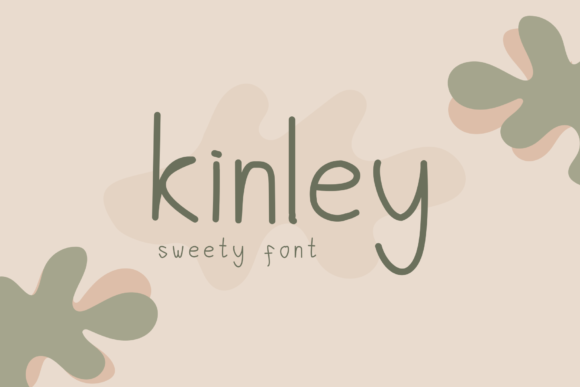
Kinley: A Handwritten Font That Fits Real Workflows
Kinley isn’t just another script font—it’s a modern handwritten typeface designed with authenticity in mind. Its subtle irregularities, natural stroke variation, and relaxed rhythm mimic the warmth of real pen-on-paper writing without sacrificing legibility or versatility. For professionals, creators, educators, and small business owners who balance aesthetics with function, Kinley bridges intention and execution. It doesn’t shout for attention; instead, it supports clarity, personality, and consistency—wherever human voice matters in design or communication.
Where Kinley Fits in Your Process
Fonts aren’t used in isolation—they’re part of a sequence: planning → drafting → refining → sharing → iterating. Kinley excels when you need to signal approachability without compromising professionalism. Think of it as a tool that enters your workflow at specific inflection points—not at every stage, but where tone and trust matter most.
Before launching a campaign, Kinley helps define brand voice during mood board development or early mockups. During content creation, it anchors key messages in newsletters, workshop handouts, or course welcome pages. After publishing, it reinforces recognition in social graphics or printed thank-you cards. It’s rarely the default for body text—but often the right choice for headlines, quotes, callouts, or signature elements that benefit from human texture.
Integration With Tools You Already Use
Kinley works seamlessly across platforms where typography flexibility exists. In Figma or Adobe XD, install it locally or sync via Adobe Fonts for consistent preview and export. In Canva, upload the OTF or TTF file to your Brand Kit—then apply it to headings, banners, or email headers with predictable rendering. For WordPress users, pair Kinley with a lightweight webfont loader (like wp_enqueue_style + self-hosted files) to avoid render delays while keeping load times low.
It pairs well with clean sans-serifs like Inter, Lato, or Open Sans—creating contrast that guides attention without visual noise. Avoid stacking multiple decorative fonts; Kinley’s strength lies in its singularity. One instance per layout is often enough to shift perception meaningfully.
Practical Implementation Tips
- Use it intentionally, not ornamentally. Kinley shines when it carries meaning—e.g., a founder’s quote on an About page, a handwritten-style CTA in a lead magnet, or lesson titles in an online course syllabus. If it doesn’t serve voice or hierarchy, skip it.
- Test readability at scale. At 16px or smaller, Kinley’s fine details soften. Reserve it for sizes 24px and up in digital contexts, or use tighter tracking and increased line height if needed for mid-size applications like subheadings.
- Prepare fallbacks early. Define system-font backups in CSS (
font-family: "Kinley", "Segoe UI", system-ui, sans-serif;). This ensures graceful degradation if loading fails or on unsupported devices. - Limit weight usage. Kinley includes Regular and Bold weights—but no Light or Italic variants. Don’t force stylistic variety through faux-italics or scaling. Instead, use spacing, color, or layout to create emphasis.
Workflow Examples Across Roles
For educators: Use Kinley for weekly learning objectives or reflection prompts inside LMS dashboards (Canvas, Moodle). Its informality lowers cognitive load for students scanning instructions—especially in asynchronous settings where tone impacts engagement. Pair it with a structured grid and clear icons to maintain organization.
For freelancers: Apply Kinley to proposal cover pages or project milestone summaries sent to clients. It subtly signals care and craft—distinct from templated corporate language—while staying professional enough for B2B contexts. Save time by building reusable Canva templates with Kinley preloaded.
For small business owners: Integrate Kinley into packaging inserts, thank-you notes, or limited-run product labels. Because it feels handmade, it enhances perceived value—even when printed digitally. Just ensure your printer confirms glyph support for accented characters if serving multilingual audiences.
For marketers: Deploy Kinley in email subject lines (via supported clients like Mailchimp) or landing page hero sections. Its distinct shape increases scanability in crowded inboxes or above-the-fold layouts. Track open rates and scroll depth before/after implementation—you’ll often see lift in dwell time where personality resonates.
Preparation and Long-Term Usability
Adopting Kinley isn’t about installing a font—it’s about aligning it with your standards. Start by auditing current assets: Where do you currently use generic scripts or overused handwriting fonts? Identify three recurring touchpoints (e.g., Instagram story text, PDF report covers, workshop worksheets) and prototype Kinley there first.
Check compatibility across your stack: Does your CMS allow custom font uploads? Does your email service provider support embedded webfonts? Does your print vendor accept OTF files with full Unicode coverage? Address gaps before rollout—don’t assume universal support.
Consistency follows structure. Create a simple internal guide: “Kinley is used only for primary headlines, pull quotes, and handwritten-style CTAs. Never for body copy, data tables, or legal disclaimers.” Share this with designers, writers, and contractors so usage stays intentional—not decorative.
Quality Control and Iteration
Because Kinley mimics handwriting, minor inconsistencies are part of its character—not flaws. But that doesn’t mean skipping proofing. Always preview rendered output on multiple devices: Kinley’s lighter strokes may disappear on low-resolution screens or appear too thin in dark mode. Adjust background contrast or add subtle text shadows where needed.
Track usage over time. After 6–8 weeks, review analytics: Are pages using Kinley seeing higher time-on-page or lower bounce rates? Are clients referencing the “friendly feel” of your materials in feedback? Let real-world response—not assumptions—guide expansion or refinement.
When Kinley Isn’t the Right Fit
There are valid reasons to set Kinley aside. Avoid it in highly regulated contexts (e.g., medical disclosures, financial terms) where clarity and neutrality outweigh expressiveness. Skip it in dense UI components like form labels or navigation menus—its organic flow slows scanning. And don’t reach for it when speed or automation dominates: auto-generated reports, bulk email blasts, or system alerts benefit more from functional, high-contrast type.
The goal isn’t to use Kinley everywhere—it’s to recognize where its authenticity adds measurable value. That discernment separates thoughtful implementation from trend-chasing.
Moving Forward With Purpose
Kinley works best when treated as a deliberate instrument—not a shortcut to “personality.” Its power emerges in context: the quiet confidence of a teacher’s welcome note, the grounded warmth of a local bakery’s seasonal menu, the focused energy of a creator’s workshop title. These aren’t flourishes. They’re signals—telling people, “This was made with attention. You’re seen.”
To integrate Kinley sustainably, start narrow. Pick one repeatable use case aligned with your goals. Test it with real users. Refine based on how it performs—not how it looks in isolation. Then expand only where evidence supports it. That approach builds not just visual cohesion, but trust, efficiency, and long-term usability across your work.